
Information overload is the state you reach when more information arrives than you can process, so your focus, memory and decisions start to suffer. It is not a lack of discipline. It is a mismatch between the volume coming in and the fixed capacity of your attention.
If you have ever opened a laptop to study and found 40 unread messages, six browser tabs from yesterday and a group chat demanding a reply, you know the feeling. This guide explains what information overload is, why it happens, what it does to your thinking, and the specific habits that research shows can reduce it.
What Is Information Overload?
The clearest definition comes from a widely cited review by Martin Eppler and Jeanne Mengis, who pulled together 30 years of research from organization science, accounting, marketing and information systems. Their summary is simple: information overload occurs when the supply of information exceeds your capacity to process it.
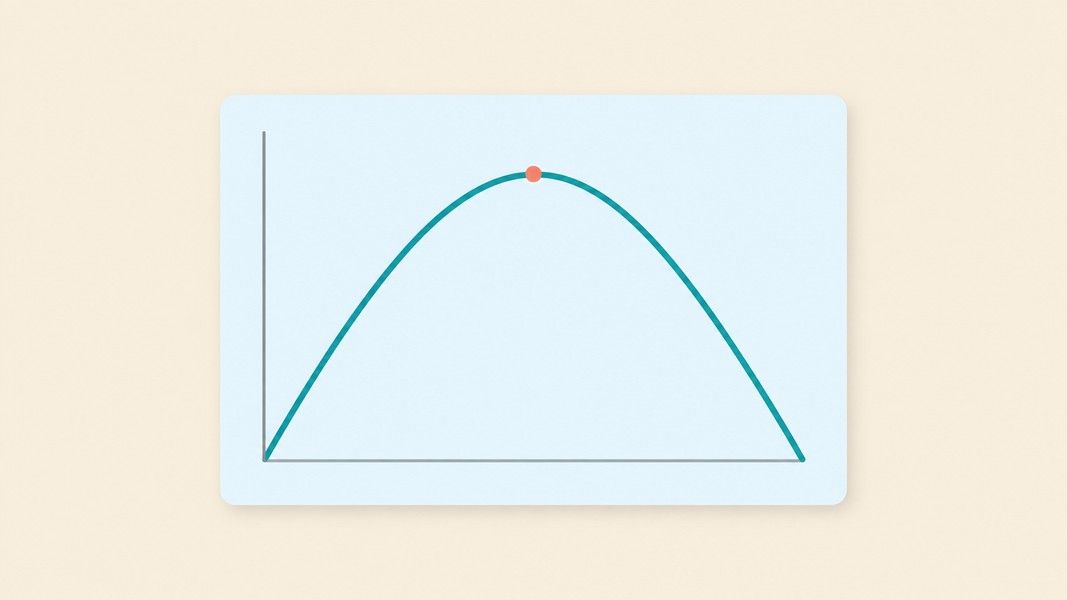
Their review, published in The Information Society, also describes the relationship as an inverted U curve. Up to a point, more information improves your decisions. Past that point, every extra input makes your decisions worse, not better.
That curve explains why the problem is so easy to miss. Collecting more sources, saving more articles and joining more channels feels productive, because early on it is. The harm only shows up once you cross the peak, and by then the extra input feels normal.
Information overload meaning in plain terms
Think of your attention as a desk. A few documents on it help you work. Pile on a hundred and you spend your time moving paper around instead of reading any of it. The desk did not shrink. The pile simply grew past what the desk can hold.
Information Overload Examples From School and Work
Information overload rarely arrives as one big event. It builds from small, ordinary inputs that each seem harmless.
For a student, it looks like a week with four lectures, two reading packs, a shared slide deck, a course forum and a messaging group for every class. Each source is reasonable. Together they create more material than anyone can review, so most of it gets skimmed once and never seen again.
For a professional, the numbers are measurable. Microsoft's Work Trend Index found that the average worker receives 117 emails a day, most of them skimmed in under 60 seconds. Its telemetry shows that people using Microsoft 365 are interrupted every two minutes during core work hours by a meeting, an email or a chat.
Other common examples include:
- Reading three news apps every morning and remembering none of the stories by lunch
- Saving dozens of articles to read later and never opening the list again
- Sitting through a meeting while answering chat messages, then not recalling what was decided
- Keeping 20 tabs open because closing them feels like losing information
Why Information Overload Happens: 4 Root Causes
Fixing information overload starts with knowing which cause is driving it for you. Most people have more than one.
1. Volume outruns a fixed capacity
Your brain holds only a small amount of information in active use at once. The post on how working memory works covers this limit in detail. When the volume of incoming material grows and that capacity stays the same, something has to drop out, and usually it is the thing you most needed to remember.
2. Constant interruptions
Every notification asks your attention to leave what it is doing. Microsoft's analysis of the infinite workday found that for the users who receive the most pings, interruptions add up to 275 a day. The problem is not any single message but the fact that none of your work gets a long, unbroken stretch.
3. Fragmented attention and costly restarts
Gloria Mark and her colleagues at UC Irvine observed information workers in their real offices. In their study of fragmented work, people spent about 11 minutes on a project before switching to another one or being interrupted. When someone else interrupted the work and it was resumed the same day, getting back to it took an average of about 22 and a half minutes.
That gap matters. An interruption that lasts 30 seconds can cost far longer than 30 seconds, because you have to rebuild where you were.
4. Open loops: saving everything, processing nothing
The quietest cause is collecting without processing. Bookmarks, screenshots, voice memos and downloaded PDFs all feel like progress. Each one is also an unfinished task your mind keeps track of. A large backlog of unprocessed material is a form of overload even when no new message arrives.
Effects of Information Overload on Focus and Decisions
The effects show up in three places: how well you think, how you feel, and what you actually get done.
Decision quality drops
The inverted U from the Eppler and Mengis review is the core effect. Past the peak, extra information leads to worse choices, slower choices, or no choice at all as you keep searching for one more source.
Stress rises
Research on email and notifications, covered in the next section, shows that the frequency of incoming information is linked to daily stress, not only its total amount. The review by Eppler and Mengis also lists stress and anxiety among the dysfunctional consequences of overload.
Learning gets shallower
When you skim everything, you encode almost nothing. Students under overload often feel they have covered the material because they have seen it, then discover in the exam that seeing is not the same as remembering.
Work fragments
Switching between inputs feels like multitasking, but the evidence points the other way. The post on why task switching costs focus explains why your brain handles one demanding task at a time and pays a price at every switch.
How to Deal With Information Overload
The good news is that the strongest fixes are not about consuming less in total. They are about controlling when information reaches you and what you do with it once it arrives.
Check email in batches
Kostadin Kushlev and Elizabeth Dunn at the University of British Columbia ran a two-week experiment with 124 adults, about two thirds of them students. For one week, participants limited email checks to three times a day. For the other week, they checked as often as they liked.
During the limited week, people checked email about 4.7 times a day instead of about 12.5, and they reported significantly lower daily stress. Lower stress in turn predicted higher well-being across several measures. Their study on checking email less is one of the clearest experiments on this question. Participants also found the rule hard to keep, which is a useful warning: plan for the urge to check.
Batch your phone notifications
A follow-up field experiment by Nicholas Fitz, Kostadin Kushlev and colleagues tested 237 smartphone users with a custom app that held notifications back. Some received alerts as usual, some received them in batches, and some never received them.
People whose notifications arrived in three daily batches felt more attentive, were in a better mood, felt more in control of their phones and reported lower stress. Batching every hour produced little change compared with normal use. The lesson is that the schedule has to be sparse enough to create real quiet time.
Many phones offer focus modes or scheduled notification summaries. Set yours to deliver non-urgent alerts at three fixed times, such as morning, after lunch and early evening.
Close the loop at the moment of capture
Open loops are a major source of overload, so the fix is to turn raw input into something finished as soon as you collect it. A lecture recording you never listen to again is just another unread item. A short, structured note with the key points is something you can actually use.
This is where an AI note taker helps. Primo Notes takes a recording, a PDF, a YouTube link or a web page and returns a title, a structured note and a formatted transcript, so the processing step happens without a separate filing session. You can then summarize the note or turn it into flashcards and a quiz, which moves the material from saved to studied.
Cut sources, not just time
Look at every channel that sends you information and ask whether it changes what you do. A newsletter you never act on, a group chat for a project that ended, or a third news app that repeats the first two can all go. Fewer sources with higher value beat many sources skimmed.
Single-task in protected blocks
Pick one task and give it a block of at least 25 to 50 minutes with notifications off and other tabs closed. Given how short typical work stretches are in Mark's observations, even one protected block a day is a meaningful change.
A One-Week Plan to Reduce Information Overload
Changing every habit at once tends to fail, so spread the changes over a week and keep the ones that work.
- Days 1 and 2: Audit your inputs. List every app, inbox, chat and feed that sends you information, and unsubscribe from or mute anything you have not acted on in a month.
- Days 3 and 4: Set email to three fixed check times and turn on notification summaries at three times a day. Expect the first day to feel uncomfortable.
- Day 5: Clear one backlog. Take your read-later list or a folder of recordings and either process each item into a short note or delete it.
- Days 6 and 7: Schedule one protected focus block each day and notice how much you finish compared with an interrupted day.
If you study from lectures, a simple rule keeps the backlog from returning: process every recording into notes the same day. With Primo Notes, that means recording the lecture and reviewing the generated note and transcript that evening, instead of adding another file to a growing pile.
Information Overload Is a Capacity Problem You Can Manage
Information overload happens when incoming information exceeds your capacity to process it, and past that point more input makes your decisions worse. Its main causes are sheer volume, constant interruptions, fragmented attention and a backlog of unprocessed material.
The research points to practical fixes. Checking email three times a day lowered stress in a controlled experiment, and batching phone notifications three times a day made people more attentive and less stressed, while hourly batching did little. Cutting low-value sources, processing what you capture right away and protecting single-task blocks all reduce the load on a capacity that will not grow on its own.