
The Getting Things Done method, or GTD, is a personal productivity system built on one idea: get every commitment out of your head and into a trusted system, then decide what to do from that system instead of from memory. It runs in five steps, capture, clarify, organize, reflect and engage, and each step answers a different question about the things competing for your attention.
If your to-do list feels endless while the important things still slip, the problem is rarely effort. It is that your brain is doing two jobs at once: remembering everything and deciding what matters. GTD separates those jobs. This guide walks through each of the five steps, the research that explains why the method works, a week of GTD in practice, and the places where people usually give up on it.
What the Getting Things Done Method Is
David Allen introduced GTD in his book Getting Things Done: The Art of Stress-Free Productivity, first published in 2001 and revised in 2015. Allen had spent years coaching knowledge workers who were buried under unprocessed email, notes and half-started projects, and the method grew out of that work.
The David Allen Company describes GTD as five clear steps that "apply order to chaos", and its official overview of the method sums each one up in a single verb. The core promise is not that you will do more, but that you will always know what you are not doing, and be at peace with it. Allen's own line for this is that your mind is for having ideas, not holding them.
What sets GTD apart from a simple to-do list is that it is a full workflow. A to-do list stores tasks. GTD tells you how every input should be handled, from the moment something grabs your attention to the moment you act on it, and how often the whole system gets checked.
Why GTD Works: The Research Behind It
GTD was built from practice, not from a lab, but psychology has since caught up with it. In a 2008 paper in Long Range Planning, Francis Heylighen and Clément Vidal argued that insights from cognitive science support GTD's recommendations, especially its focus on turning tasks into "actionable" external memories and on choosing work based on the situation you are in. Their review of GTD notes that David Allen commented on the paper and confirmed that their reading of the method was essentially correct.
The strongest evidence comes from research on the Zeigarnik effect, the tendency of unfinished goals to keep intruding on your thoughts. In a 2011 series of studies, psychologists E. J. Masicampo and Roy Baumeister found that unfulfilled goals hurt performance on unrelated tasks. When participants were allowed to make a specific plan for the goal, without completing it, the interference disappeared. In one study, people who planned how to get their personal tasks done read a passage with less mind wandering.
Making a plan, not finishing the task, is what frees your attention. That is exactly what GTD's capture and clarify steps do: they turn a vague "I need to deal with that" into a written next action with a place to live. According to the published study, once a plan exists, the drive to pursue the goal is suspended and resumes at the time you specified.
The 5 Steps of GTD at a Glance
Each step does one job, and the order matters:
- Capture: collect everything that has your attention into a few trusted inboxes.
- Clarify: decide what each item means and what, if anything, the next action is.
- Organize: put each result in the right place, a list, a calendar or a reference file.
- Reflect: review the whole system often enough to keep trusting it.
- Engage: choose what to do now, based on context, time and energy.
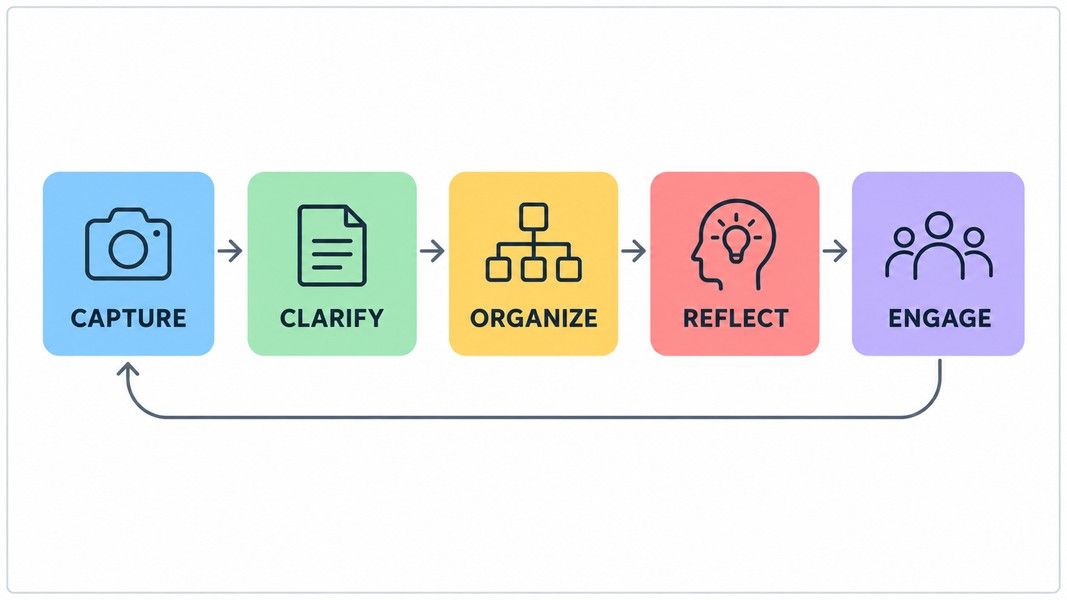
The sections below take each step in turn, with the decisions it asks you to make.
Step 1: Capture Everything That Has Your Attention
Capture means writing, recording or gathering anything that has your attention into a collection tool. That includes tasks, ideas, worries, promises you made in a hallway and the article you meant to read. Size does not matter. A thought about your thesis and a reminder to buy batteries go into the same inbox.
The goal is completeness. If even a few commitments stay in your head, your mind cannot trust the system and keeps rehearsing them anyway. Most people start with a full mind sweep, the same exercise as a brain dump, writing down everything until nothing is left.
Keep Your Inboxes Few and Easy
You need as few capture points as possible, and each must be quick to reach. A paper tray on your desk, an email inbox and one place on your phone usually cover it. The more inboxes you have, the more places you have to empty later.
Speed matters most when you are away from a desk. Speaking a thought into your phone is faster than typing it, and it works while walking between classes. Primo Notes turns a voice recording into a written note with its own title, so a rambling thirty-second capture comes back as something you can process in the next step instead of an audio file you have to replay.
Step 2: Clarify What Each Item Means
Clarifying is where most of the thinking happens. For each item in your inbox, you ask one question: is it actionable?
If it is not actionable, there are three options. It is trash, so you delete it. It is reference material, so you file it where you can find it. Or it is something you might do later, so it goes on a Someday/Maybe list.
If it is actionable, you decide the very next physical action. Not "plan the presentation" but "email Sara to ask for last quarter's numbers". A good next action is specific enough that you could do it without thinking further. If reaching the outcome takes more than one action, you also have a project.
The Two-Minute Rule
One of the best-known parts of GTD sits inside this step. If a next action takes less than two minutes, do it now. Tracking it would take longer than doing it. Heylighen and Vidal link this rule to research on task switching: staying in the same context avoids the cost of reacquiring focus later.
Anything longer than two minutes gets delegated, in which case it goes on a Waiting For list, or deferred to one of the lists in the next step.
Step 3: Organize It Into the Right Lists
Organizing means parking each clarified item where it belongs, so the right reminder shows up at the right time. GTD uses a small set of lists, each with a strict meaning:
| List | What goes on it |
|---|---|
| Projects | Any outcome that needs more than one action and can be finished within a year |
| Next Actions | The single next physical step for each project and every standalone task |
| Waiting For | Things you delegated or are expecting from someone else |
| Calendar | Only actions that must happen on a specific day or at a specific time |
| Someday/Maybe | Ideas you are not committing to now |
| Reference | Information with no action attached |
The project definition comes straight from the David Allen Company's guide to managing projects, which defines projects as outcomes that require more than one action step and can be marked finished within 12 months. The same guide notes that most people have between 10 and 100 current projects, personal and professional.
Use Contexts to Group Next Actions
Next actions are often split by context: the tool or place you need to do them. Calls, errands, computer and home are common groups. When you are at your desk with twenty minutes free, you only look at the actions you can do there. This is the "situation-dependent execution" Heylighen and Vidal describe: you choose work based on where you are, rather than ranking everything in advance.
Step 4: Reflect With the GTD Weekly Review
A system you do not review stops being trusted, and a system you do not trust stops being used. The reflect step keeps it current. You look at your lists daily as needed, and once a week you do a full review.
David Allen has called the Weekly Review the critical success factor for making GTD stick. The official review checklist groups it into three phases:
- Get clear: gather loose papers and notes, process every inbox to zero, and empty your head of anything uncaptured.
- Get current: review next actions, the past and upcoming calendar, the Waiting For list and every project, making sure each project has at least one next action.
- Get creative: go through Someday/Maybe and add any new ideas worth keeping.
The checklist suggests early Friday afternoon as a good time, since the review tends to surface small actions you can still complete while people are at work. For a student, Sunday evening often works better, before the new week of classes begins.
The test of a finished review is simple: every project has a next action, and nothing is sitting in an inbox.
Step 5: Engage and Choose What to Do Now
Engaging is the payoff. Because every commitment is captured, clarified and organized, choosing what to do becomes a quick decision rather than a search through memory.
Allen's approach narrows the choice in order. First, context: what can you do where you are, with the tools you have? Then time available: a ten-minute gap calls for a different action than a free afternoon. Then energy: tired evenings suit easy admin, fresh mornings suit hard thinking. Only after those filters do you weigh priority.
This is a different mindset from strict prioritizing. Heylighen and Vidal note that GTD shifts the focus from establishing priorities to keeping track of opportunities and commitments for action. If you want to protect deep work inside that flexibility, GTD pairs well with time blocking on the calendar for the few things that truly need a fixed slot.
A GTD Workflow in Practice: One Student's Week
Here is how the five steps look for a university student juggling three courses and a part-time job.
On Monday, a professor announces a group presentation during a lecture. The student records the lecture, and the assignment details land in the capture inbox along with everything else from the day. In the evening, clarifying turns "group presentation" into a project with a first next action: message the group to set a meeting time.
On Wednesday, the group meets. Several people agree to research different sections, so the student adds each of those to Waiting For. Primo Notes labels each speaker in a recorded meeting, and its follow-up email tool drafts a message from that note, so the Waiting For list becomes something the whole group receives in writing.
The rest of the week runs on contexts. Library time goes to computer actions, the bus ride goes to reading, and two-minute replies get done the moment they come up. On Sunday, the Weekly Review shows the presentation project has no next action left, so the student adds one: draft the slide outline. Nothing slipped, because nothing depended on memory. For the meeting half of this loop in more detail, see this guide to tracking action items from capture to completion.
Where the GTD Method Breaks Down
GTD fails in predictable ways, and most of them come from skipping a step rather than from the method itself.
Skipping the Weekly Review
This is the most common failure. Lists drift out of date, the inbox fills up, and within a few weeks the system no longer reflects reality. Once you stop trusting it, your head starts holding commitments again, which undoes the whole point. If you can only keep one habit, keep the review.
Vague Next Actions
"Work on essay" is not a next action. It is a project wearing a disguise. When a list item needs more thinking before you can start, you will skip it every time. Rewrite it as the first visible step, such as "open the essay prompt and list three possible arguments".
Too Many Tools and Too Many Lists
It is easy to spend more time building the system than using it. GTD works on paper, in a notes app or in a task manager, and the official setup guides point out that no single tool handles everything. Start with the six lists above and add structure only when something keeps getting lost.
Complete Workflow at a Glance
Pulling it together, the Getting Things Done method moves every input through the same path:
| Step | Question it answers | Output |
|---|---|---|
| Capture | What has my attention? | Items in a few trusted inboxes |
| Clarify | What is it, and is it actionable? | Trash, reference, someday, or a next action and project |
| Organize | Where does the reminder belong? | Items on the right list or calendar |
| Reflect | Is the system still current? | A clean Weekly Review, every project with a next action |
| Engage | What should I do right now? | A confident choice by context, time and energy |
Conclusion
The Getting Things Done method works because it separates remembering from deciding. Capture gets everything out of your head, clarify turns each item into a concrete next action, and organize puts it on a list with a single meaning. Reflect keeps the system trustworthy through the Weekly Review, and engage lets you choose by context, time and energy instead of guilt.
The research behind GTD points to the same mechanism: a written plan for an unfinished task releases the attention that task was holding. You do not need a perfect setup to get that benefit. A few inboxes, six lists and one honest review each week are enough to start.