

The Eisenhower matrix is a 2x2 grid that sorts every task by two questions: is it urgent, and is it important? The answers put each task in one of four quadrants, and each quadrant comes with its own action: do it now, schedule it, delegate it, or delete it.
If your to-do list feels like a wall of equal demands, that is the problem this tool solves. It does not give you more time. It shows you which tasks deserve the time you already have, and which ones only feel that way because a deadline is shouting at you.
This guide walks through where the matrix comes from, what goes in each quadrant, and a seven-step process for using it on a real week, with worked examples for students and for work.
What Is the Eisenhower Matrix?
The matrix takes its name from Dwight D. Eisenhower, though he never drew it. In an August 1954 address in Evanston, Illinois, he quoted an unnamed former college president who said, "I have two kinds of problems, the urgent and the important. The urgent are not important, and the important are never urgent." The full speech is preserved by the American Presidency Project, and that one line is the whole seed of the method.
Decades later, Stephen Covey turned the idea into a time management grid in The 7 Habits of Highly Effective People (1989). That is why you will see the same tool called the Eisenhower decision matrix, the urgent-important matrix, or Covey's time management matrix. They all describe the same four boxes.
The core insight is that urgency and importance are separate measurements. Urgency is about time: how soon something needs a response. Importance is about outcome: how much it moves your goals, grades, health, or relationships. Most stress comes from treating the first as if it were the second.
The 4 Quadrants of the Eisenhower Matrix
The grid has urgency on one axis and importance on the other. Every task lands in exactly one box.
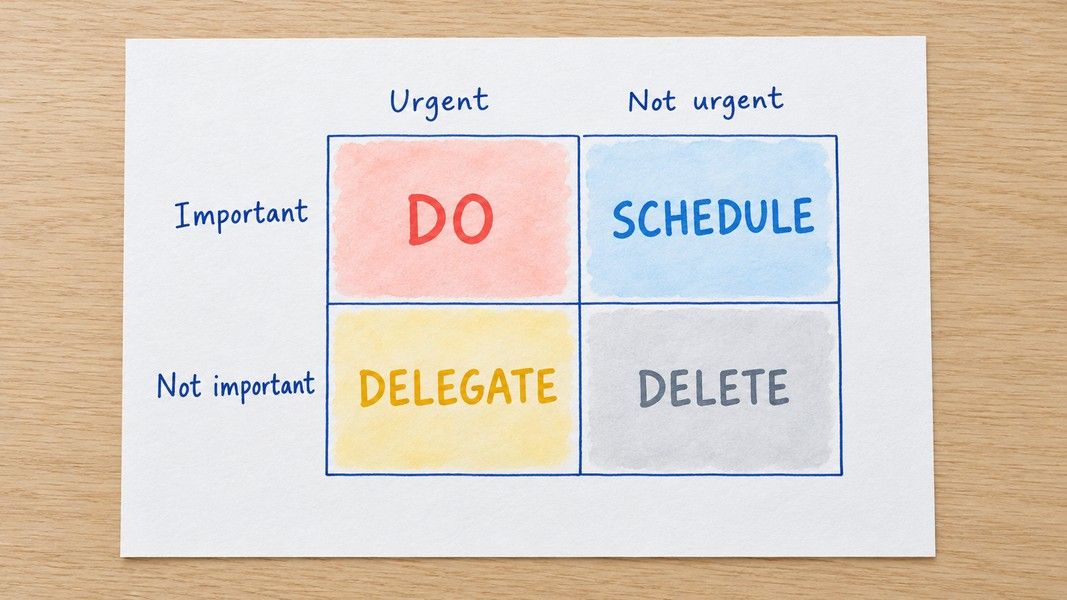
Quadrant 1: Urgent and Important (Do)
Deadlines today or tomorrow, real emergencies, a problem that gets worse by the hour. These tasks get done now, by you. A study handout from Purdue University warns that living mostly in this quadrant leaves you stressed and headed toward burnout.
Quadrant 2: Important, Not Urgent (Schedule)
Long-term projects, studying in advance, exercise, planning, building skills. Nothing forces you to do these today, which is exactly why they slip. The Purdue handout labels it the quadrant of quality, and the goal of the whole matrix is to spend more of your week here.
Quadrant 3: Urgent, Not Important (Delegate)
Interruptions, most notifications, some meetings, requests that matter more to someone else than to you. These feel pressing but do little for your goals. At work you can often hand them off. As a student you usually cannot, so treat this quadrant as "minimise or batch" instead.
Quadrant 4: Neither Urgent nor Important (Delete)
Scrolling, busywork, reorganising a folder that was already fine. Drop these, or keep them as deliberate rest rather than something you drift into.
What You'll Need
The method is simple enough to run on paper, but a few things make it work better:
- A complete list of everything on your plate, not just what you remember right now
- A clear sense of your goals for the week or term, since importance is measured against them
- A calendar or planner where Quadrant 2 tasks can get real time slots
- Fifteen to twenty minutes once a week for the sort itself
The goals point matters most. Without them, every task looks important, and the matrix collapses into a single box.
How to Use the Eisenhower Matrix in 7 Steps
Step 1: Capture Every Task
Start with a full brain dump. Write down assignments, work tasks, errands, messages you owe, and the vague worries that keep resurfacing. Speaking is often faster than typing here: record a two minute voice note while you walk, and Primo Notes turns the recording into a written note with a title, so the whole list is in front of you, ready to sort.
Step 2: Name Your Goals
Write down two or three goals for the period you are planning. "Pass organic chemistry with a B or better" or "ship the client report by Friday" is enough. Importance only means something when you can point to the goal a task serves.
Step 3: Ask the Urgency Question
Go through the list and mark each task urgent or not. A task is urgent when delaying it by a day or two has a real cost: a missed deadline, a penalty, a blocked colleague. A notification is not urgency by itself.
Step 4: Ask the Importance Question
Now mark each task important or not, measured against the goals from Step 2. Do this as a separate pass. Asking both questions at once lets urgency leak into your judgment of importance, which is the exact mistake the matrix exists to catch.
Step 5: Place Each Task in a Quadrant
Combine the two marks and drop every task into its box. If one quadrant holds more than about half your list, look again. A full Quadrant 1 often hides Quadrant 3 tasks wearing a deadline, and a full Quadrant 4 usually means you were honest, which is good news.
Step 6: Act on Each Quadrant
Do the Quadrant 1 tasks first. Put every Quadrant 2 task on your calendar with a specific time, which pairs well with time blocking. Hand off or batch Quadrant 3. Cross out Quadrant 4.
Delegating works best with a written record. If a meeting produced tasks for other people, record it: Primo Notes labels each speaker and its follow-up email tool drafts the summary you send, so the person taking the task has it in writing.
Step 7: Review Weekly
The matrix is a snapshot. Tasks move between quadrants as deadlines approach, and an ignored Quadrant 2 task eventually becomes a Quadrant 1 emergency. Re-sort once a week, ideally in the same session where you plan your calendar.
During the review, look at what actually happened, not only at what is next. Which Quadrant 2 slots did you keep, and which ones got eaten by something that felt urgent? That pattern tells you more about your week than the grid itself, and it is the part most people skip.
Eisenhower Matrix Examples for Students and Work
Seeing a filled-in grid makes the method click faster than any definition.
A Student's Week
| Quadrant | Example tasks |
|---|---|
| 1. Do | Lab report due tomorrow, studying for Thursday's quiz |
| 2. Schedule | Reviewing lecture notes for finals, starting the term paper, sleep and exercise |
| 3. Minimise | Group chat threads, a club meeting you joined out of habit |
| 4. Delete | Reformatting notes that were already readable, endless app scrolling |
Notice that the most valuable items for the term, review and the term paper, sit in Quadrant 2. Nothing makes them urgent until finals week, which is when cramming begins.
A Workday
| Quadrant | Example tasks |
|---|---|
| 1. Do | Fixing a bug that blocks a release, a client deliverable due today |
| 2. Schedule | Quarterly planning, learning a new tool, one-on-ones with your team |
| 3. Delegate | Routine status updates, scheduling logistics, a report someone else can draft |
| 4. Delete | Meetings with no agenda, inbox sorting beyond what is needed |
If you already use a capture system like the GTD method, the matrix slots in at the point where you decide what to do next.
Why Urgent Tasks Win Without a System
There is research behind the feeling that urgent tasks hijack your day. In five experiments published in the Journal of Consumer Research in 2018, Meng Zhu, Yang Yang, and Christopher Hsee found that people chose unimportant tasks with a short completion window over important tasks with a clearly better payoff. The researchers called it the mere urgency effect: urgency attracts people even when it is spurious, such as an illusion of expiration.
In other words, a deadline can pull you toward a worse choice even when you can see it is worse.
The finding has held up. An independent replication with 2,374 participants, published in the same journal in 2026, concluded that a tendency to prioritize tasks seen as urgent can lead to suboptimal decisions, even when the urgency is illusory.
This is the practical case for the Eisenhower matrix. Separating the urgency question from the importance question forces a second look at tasks that only feel pressing, before you spend an afternoon on them.
Tips for Better Results
A few habits keep the matrix from becoming another list you ignore:
- Keep Quadrant 1 short by doing Quadrant 2 early, since most emergencies are neglected plans
- Limit yourself to around ten tasks per quadrant, and split anything bigger into smaller tasks
- Give every Quadrant 2 task a calendar slot, because "someday" is not a time
- Treat rest as Quadrant 2, not Quadrant 4, so it gets protected instead of feeling like guilt
The most important of these is the first. The matrix pays off when Quadrant 2 grows and Quadrant 1 shrinks over the following weeks. If that is not happening, the scheduling step is being skipped.
Troubleshooting Common Issues
Everything Looks Important
This usually means your goals are vague. Go back to Step 2 and make them specific enough that a task can clearly fail to serve them.
Quadrant 1 Never Empties
If urgent and important tasks keep piling up, you are likely reacting to problems that earlier Quadrant 2 work would have prevented. Reserve one block a day for Quadrant 2, even a short one, and protect it.
You Cannot Delegate Anything
That is normal for students and solo workers. Rename Quadrant 3 to "minimise": batch messages into two set times, decline what you can, and give the rest a hard time limit.
The Matrix Takes Too Long
Sort only new tasks during the week and do the full re-sort once on the weekend. The first sort takes longest; after that it is mostly maintenance.
Conclusion
The Eisenhower matrix comes down to asking two questions separately: how soon does this need me, and how much does it matter? Urgent and important tasks get done now, important tasks get scheduled, urgent distractions get handed off or batched, and the rest gets dropped.
The research on the mere urgency effect explains why this is harder than it sounds: deadlines pull attention even when the payoff is small. A weekly sort, honest goals, and real calendar time for Quadrant 2 are what turn the grid from a diagram into a habit that changes how your week actually goes.