Knowing how to annotate comes down to one habit: write short notes in your own words while you read, and mark the text only sparingly. Survey the text first, write the main point of each section in the margin, keep a small set of symbols, put questions where you get lost, and end by turning those notes into questions you can answer without looking.
Most people annotate by highlighting, and the page ends up yellow from top to bottom. That feels productive and does very little. This guide walks through a method that works the same way for a paperback, a journal article, or a PDF on a tablet, and explains why the writing part matters far more than the colouring part.
What Annotating Does, and What It Doesn't
The research guides at Eastern Washington University define annotating as any action that deliberately interacts with a text to improve your understanding of it, your recall of it, and your reaction to it. The key word is deliberately. Running a highlighter across a line you already understand is not much of an interaction.
The case for annotating
The UNC Learning Center describes annotation as an active learning strategy that improves comprehension and retention, and adds that it can be more efficient than writing a separate set of reading notes. Classroom evidence points the same way. A 2022 study in an eighth-grade social studies class found that teaching students to annotate historical texts over six weeks raised engagement, reading comprehension, and achievement; students said it helped them slow down and break down complex passages. The authors note the limit: one middle school in South Georgia.
The case against highlighting
The best-known review of study techniques, by Dunlosky and colleagues in 2013, rated highlighting and underlining as low utility. In a classic experiment they describe, undergraduates read about 8,000 words of articles from Scientific American and Science; one week later, the students who had highlighted did no better on a 54-item test than students who simply read. In a separate study, students who underlined a 10,000-word history chapter matched the readers on factual questions but did worse on questions that required inferences.
The marking itself is not what helps; the thinking you do in your own words is. Reading researcher Timothy Shanahan told K-12 Dive that a reader who struggles with a text tends to highlight everything, because they lack the knowledge to separate important from unimportant information. The method below is built around that problem.
What You'll Need Before You Start
For a printed book you own, a pencil is enough, and a few sticky tabs help you find marked pages later. Pencil matters for textbooks you might resell and for any book you will reread years from now, when your earlier notes may embarrass you.
For a library book or a borrowed copy, do not write in it. The annotation guidelines at Loomis Chaffee School put it plainly: annotate only your own copy. Write on sticky notes placed at the edge of the page, or keep a numbered page of notes that references page and paragraph.
For a PDF, you need an app with highlight, pen, and comment tools. The one that came with your laptop or tablet usually covers everything in this guide.
You also need more time than a plain read takes. It pays back at exam time, because your review starts from your notes rather than from a cold reread.
How to Annotate in 7 Steps
These steps assume a chapter or an article you need to understand and remember, not a novel you read for pleasure. For fiction, see the section on books further down.
Step 1: Survey the text before you mark anything
Read the title, the headings, the first and last paragraphs, and anything in bold. Eastern Washington University's guide calls this the survey, your first time through the reading, and suggests asking whether the source is useful and trustworthy: who wrote it, who published it, and when.
Do not hold a pen during the survey. The point is to build a rough map, so that when you start marking you can tell a main point from a supporting detail. This is the step that answers Shanahan's objection, because it gives you enough context to choose what matters. If the survey shape looks familiar, it is the first stage of the SQ3R reading method.
Step 2: Find the main argument and restate it
Before the first full read, find the thesis: the one or two sentences that state what the author is arguing or explaining. Underline it, then write it again in the top margin in your own words.
Restating is harder than it sounds. If you cannot put the argument in a single plain sentence, you have not found it yet; go back to the introduction and the conclusion. This sentence becomes the anchor for every note that follows.
Step 3: Summarize each section in the margin
Now read properly, one section or a few paragraphs at a time. At the end of each, stop and write a phrase of five to ten words in the margin that captures the point of that section. Both the EWU and the UNC guides recommend this, and it is the core of the method.
Write the summary after you finish the section, not while you read it. Reading a full section first and then summarizing it forces you to decide what mattered, which is the selection work that highlighting skips. If you mark anything at this stage, mark only the one sentence that best supports your margin note.
Step 4: Use a small, consistent symbol key
Symbols let you flag something in a second without breaking your reading. The trick is to keep the set small and use the same symbols in every text, so that a glance at a page tells you what kind of note you left. A workable starting set:
- ? where something confuses you or raises a question
- * next to a point that is central to the main argument
- A circle around an unfamiliar term you need to define
- An arrow linking two ideas that connect, on the same page or across pages
- ! where something surprises you or contradicts what you expected
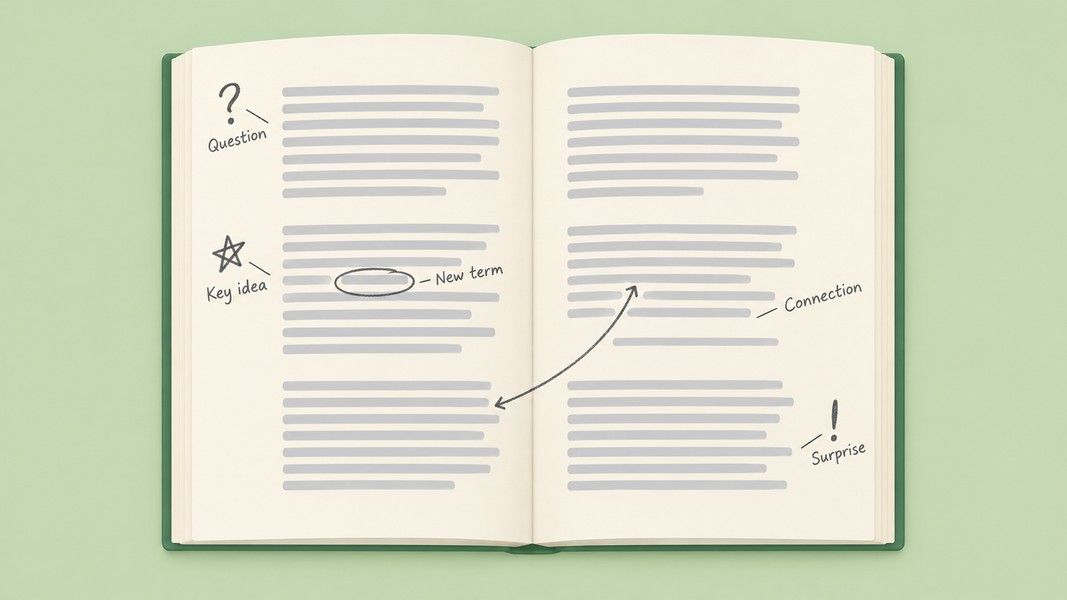
Five symbols is enough. A key with fifteen colours and shapes becomes a second thing to remember, and you end up annotating less.
Step 5: Write questions where you get lost
Every question mark from Step 4 deserves a few words: what exactly don't you understand? "Why does this contradict section 2?" is useful later. A bare "?" is not.
Also write questions the text makes you ask, even when you understood the passage. Asking why a claim is true and how it connects to what you already know is close to what researchers call elaborative interrogation and self-explanation, which the Dunlosky review rated as moderate utility, a clear step above highlighting.
Step 6: Connect ideas across pages and sources
Annotation should not stay page by page. When a later section explains or contradicts an earlier one, draw an arrow or write "see p. 42" in both places. When an article agrees or disagrees with another source you have read, name it in the margin.
These connections are what inference questions on an exam test, and they are exactly what plain underlining missed in the history chapter study. A short note at the end of the chapter listing its three or four main ideas, each with page numbers, does the same job at a larger scale.
Step 7: Turn your annotations into a test
Annotations are notes, and notes only pay off when you use them. Within a day, cover the text, read your margin summaries and questions, and try to explain each section out loud. Then turn the questions into practice questions you answer without looking.
Practice testing is one of only two techniques the Dunlosky review rated high utility, which is why this last step is the one to protect when time runs short. If you work from printed pages, Primo Notes can photograph them, reading printed text and handwriting through camera OCR, and turn the result into a structured note. From that note it builds a quiz or flashcards, so your margin work becomes something you can review on your phone. For more ways to test yourself, see these active recall techniques.
How to Annotate a Book, an Article, or a PDF
The seven steps hold for every format. What changes is where the notes go and how much you write.
How to annotate a book
For a textbook, follow the steps chapter by chapter, and use the space at the start and end of each chapter for a three-line summary. For a novel, the focus shifts from arguments to patterns: characters, recurring images, themes, and turning points. Loomis Chaffee's guidelines suggest keeping a running list of themes and motifs with page references on the inside back cover, plus a quick summary at the end of each chapter. By the last page you have an index of your own reading.
How to annotate an article
Research articles reward the survey step more than anything else. Read the abstract, the headings, and the conclusion first, then underline the thesis and write it in your own words, as the North Carolina Wesleyan and EWU library guides both recommend. On the full read, look for the evidence behind each claim and mark the method, the sample, and the limits. That is the information you will need if you later write an annotated bibliography.
How to annotate a PDF
Most PDF readers have the tools you need. On a Mac, Preview's Annotate button opens a toolbar with text, shapes, and a Scribble pen; the University of Oxford's Mathematical Institute guide notes that Preview cannot annotate in presentation mode. On a phone or tablet, apps such as OneDrive offer an Annotate pencil icon with pen and highlighter tools you use with a finger or stylus.
Use the comment or text tool for margin summaries rather than drawing everything by hand, because typed comments are searchable. If your reading comes as a long PDF, Primo Notes can take the file as an upload and return a structured note, and Ask AI lets you query that note when one of your margin questions still has no answer.
Tips for Better Annotations
A few habits separate useful annotations from decoration:
- Highlight after you understand a section, not while you read it for the first time.
- Keep each margin note under ten words; a sentence you need to decode later defeats the purpose.
- Date your notes on long readings, so you can see what changed between your first and second pass.
- Use one colour for summaries and a second for questions, and stop there.
- Review within 24 hours, while you still remember why you wrote each note.
If you only adopt one of these, make it the first. Highlighting after a section, once you know what it said, turns the highlighter into a selection tool instead of a reflex.
Troubleshooting Common Annotation Problems
Everything on the page ends up highlighted
This usually means you are marking during the first read, before you know what the section is about. Put the highlighter down, finish the section, and then allow yourself one line. In the Fowler and Barker experiment described in the Dunlosky review, the more text students highlighted, the worse they tended to score, although that link was not statistically significant in a group of 19.
Your notes make no sense a week later
The notes are too short or too private. "Imp!" next to a paragraph tells future you nothing. Write what is important and why, even if it takes six words instead of one.
Annotating takes too long
Annotate less of the text, not less carefully. On a long reading, survey everything, then do full annotation only on the sections tied to your assignment or exam. A margin summary per section is the minimum; symbols and questions come second.
The text is too hard to annotate
If you cannot tell what matters, you need more background before you can annotate well. Read a shorter introduction to the topic first, or look up the key terms you circled, and then come back to the original text.
Conclusion
Good annotation is mostly writing, not marking. Survey the text before you touch it, restate the main argument in your own words, summarize each section in the margin, keep a small symbol key, and write real questions where you get lost. Connect ideas across pages, and finish by turning your notes into a test.
The research is consistent on the main point. Highlighting on its own does little, and the parts that work are the ones that make you select, explain, and retrieve. The same seven steps apply to a textbook, a research article, a novel, or a PDF; only the place where the notes go changes.